Pink High-Back Racer Chair Guide: Lumbar Support & Fit
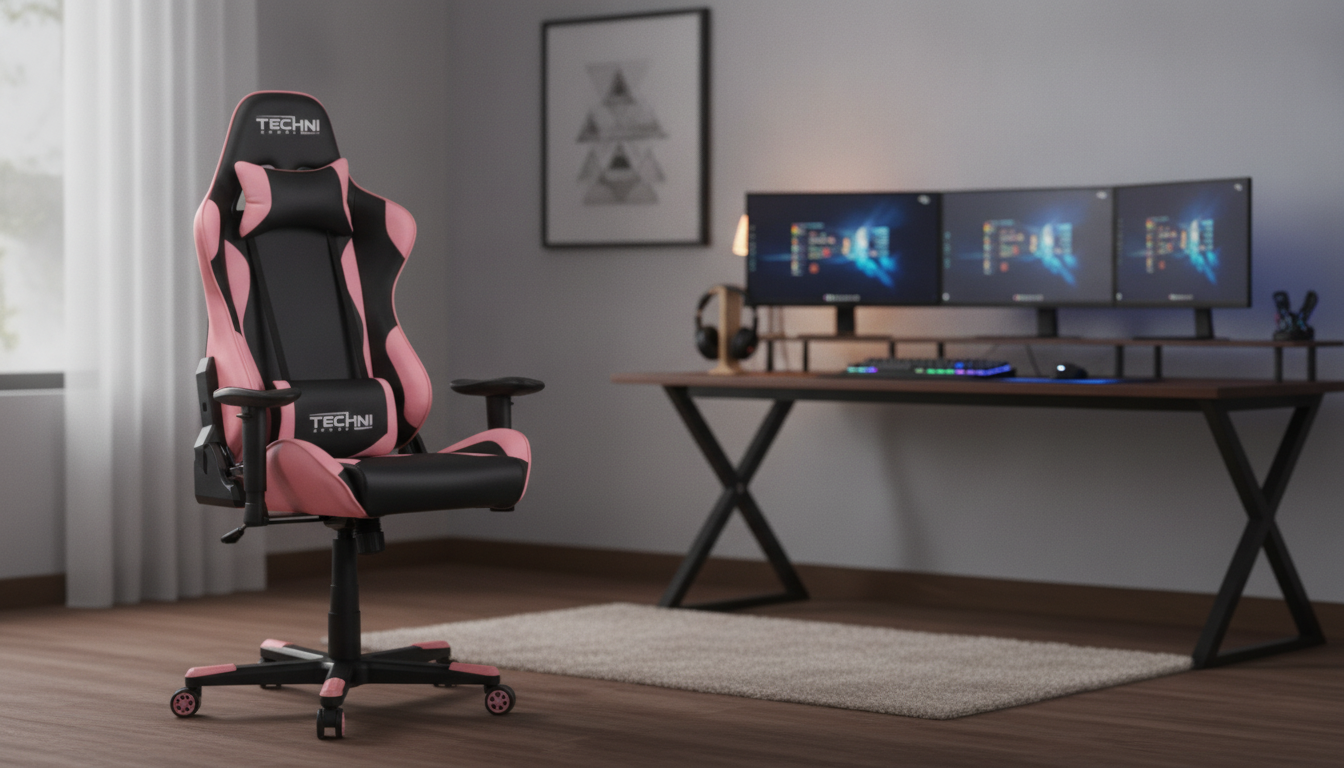
A pink high-back racer-style ergonomic gaming chair with lumbar support can be a practical upgrade for long sessions at a desk—whether that’s gaming, studying, or remote work. The right chair should help maintain a neutral spine, keep the shoulders supported, and reduce the urge to slouch as hours add up. Below is a straightforward guide to the features that tend to matter most: lumbar support, fit, adjustability, and materials.
What Makes a Racer-Style High-Back Chair Comfortable
A high-back profile supports more of the upper back and shoulders than a mid-back chair, which can help when sitting for extended periods. Racer-style side bolsters often create a “hugged” feel that some people find stabilizing—especially during intense play or when reclining—while others prefer flatter seat and back surfaces that make it easier to shift positions.
Comfort also depends on whether the chair encourages a neutral spine. When the pelvis stays more upright and the ribcage isn’t collapsing forward, it’s easier to avoid forward-head posture. A supportive headrest area can further reduce neck fatigue, particularly if the chair is used with a slight recline during breaks.
Lumbar Support: What to Look For
Good lumbar support fills the natural curve of the lower back without forcing an exaggerated arch. The most important detail is placement: the support should land around the beltline/low-back area, not mid-back. If it sits too high, it may feel like it’s pushing the spine forward rather than supporting it.
Adjustability is a major advantage because torso lengths vary. A removable lumbar pillow can work well if it stays put and has the right thickness, while built-in adjustable lumbar systems are often easier for shared setups or frequent position changes. Firmness matters too: overly soft padding may collapse over time, but overly firm support can create pressure points—especially when the chair is used upright for desk work.
| Lumbar type | Best for | Things to check |
|---|---|---|
| Removable lumbar pillow | Users who want easy repositioning | Strap placement, pillow thickness, fill firmness |
| Built-in adjustable lumbar | Shared chairs and frequent posture changes | Adjustment range, knob/slider ease, stability when reclining |
| Fixed lumbar contour | Users who prefer a set-and-forget feel | Whether the curve matches the lower-back position |
Fit and Dimensions: Getting the Right Size
Even a well-built chair can feel “off” if the dimensions don’t match the user. Seat width should allow relaxed hips without the bolsters pressing inward—consider how you sit when you’re focused, and also bulkier clothing during colder months. Seat depth should support the thighs while leaving a small gap behind the knees to avoid pressure that can affect circulation.
Backrest height influences where the lumbar curve hits and whether the shoulders feel supported. Armrest height matters for desk work: the goal is forearm support with relaxed shoulders and elbows near a 90-degree bend. Finally, check weight capacity and base stability—especially if you tend to lean, swivel frequently, or recline often.
| Body/desk factor | Target feel | Simple test |
|---|---|---|
| Seat height vs. desk | Feet flat, knees near 90 degrees | Sit with shoes on; thighs level and feet fully supported |
| Seat depth | Thigh support without knee pressure | 2–3 fingers of space behind the knee crease |
| Armrests | Shoulders relaxed, elbows supported | No shrugging; forearms rest without wrist bending |
| Lumbar position | Low-back curve supported | Lumbar pad hits beltline area when sitting upright |
Adjustability That Matters for Daily Use
For mixed use—gaming plus school or work—adjustability is often the difference between “fine for an hour” and “comfortable day after day.” Seat height adjustment should feel smooth and stable, with enough range for both shorter and taller users. Recline and tilt features help you change posture throughout the day; a secure lock mechanism is important so the chair doesn’t drift when you’re trying to sit upright.
Tilt tension should match body weight: if it’s too tight, reclining feels like fighting a spring; too loose and it can feel like falling backward. Armrest adjustments (height, pivot, and depth) can reduce wrist and shoulder strain by letting you bring support to where your keyboard and mouse actually sit. A stable swivel base and quality casters make repositioning easier and help protect floors.
Materials, Padding, and Heat Management
| Component | What to look for | Why it matters |
|---|---|---|
| Seat foam | Supportive, resilient feel | Helps prevent pressure points and sagging |
| Upholstery | Comfortable texture and manageable heat | Affects sweating, feel, and ease of cleaning |
| Base/casters | Stable base and smooth rolling | Improves safety, reduces floor wear |
Pink Design: Style Without Compromising Comfort
How to Choose the Right Chair for Your Setup
For general workstation ergonomics guidance, helpful references include OSHA’s Computer Workstations eTool, the NIOSH ergonomics overview, and the Mayo Clinic office ergonomics guide.
Setup Tips for Better Support
FAQ
Is a racer-style gaming chair comfortable for long workdays?
It can be, as long as the chair fits your body and the lumbar support hits the low-back area correctly. For work, armrest positioning and the ability to make small posture changes (tilt/recline and tension) often matter as much as the racing-style shape.
How should lumbar support feel when it’s adjusted correctly?
It should feel like gentle, steady support in the natural low-back curve without sharp pressure. If you notice pain, numbness, or tingling, the support may be too firm or positioned too high or too low.
What’s the best way to protect floors from chair casters?
Use a chair mat or casters designed for your specific floor type. Hard floors usually benefit from softer, floor-safe wheels or a mat to reduce scuffs, while thicker mats can help chairs roll more smoothly on carpet and reduce noise.














Leave a comment
You must be logged in to post a comment.